Aitishiku.com
How to Build a Knowledge Graph with Python and Neo4j [Full Handbook]

Most of the data you work with is really about relationships. A customer belongs to an account. An incident affects a service. An engineer owns a repository. You store all of that in tables, and for a long time that works perfectly well.
Then someone asks a question like this one:
Which engineers have recent context on the services affected by last night's incident?
That question is easy to understand and hard to write. In SQL it becomes four or five joins. Each join builds an intermediate result that is wider than the answer you actually want, and then throws most of it away. The query gets slower as your tables grow, and it gets harder to read every time you come back to it.
A graph database is built for that question.
In this handbook you will build a working knowledge graph from an empty database, load real data into it from Python, and write the queries that make the idea click.
You'll also learn the parts that tutorials usually skip: how to decide what becomes a node, why your first data model is probably wrong, how to make loading fast, and how to read a query plan when something is slow.
You don't need any graph experience to follow along. If you've written SQL, you already know enough.
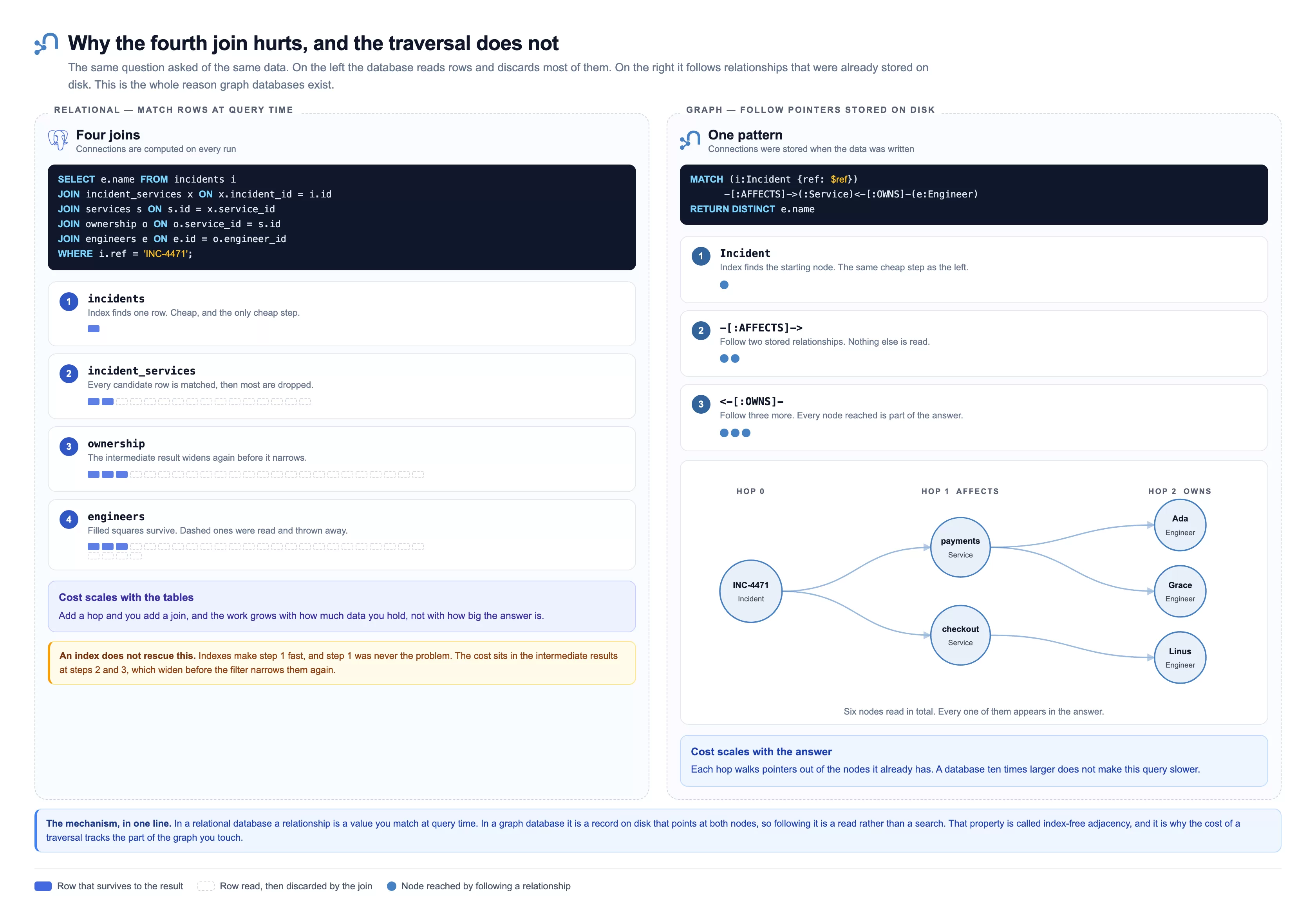
The same question asked of the same data, two ways. On the left, a relational database matches rows at query time and throws most of them away. On the right, a graph follows connections that were already stored when the data was written. The rest of this handbook is really about that difference.
All the code and the dataset are in one place: github.com/ronidas39/knowledge-graph-python-neo4j. Every script in this handbook runs, and every number is measured against the committed dataset. You can clone it and reproduce it all as you read.
Table of Contents
The Data We'll Use
Every example in this handbook runs against the same small dataset, so you can follow along from the first query to the last without ever loading something new.
It models a software team, because that's a domain most readers can check against their own experience. It's entirely made up, thought: no real company, service, or person appears in it, and the email addresses use example.com (this is reserved by RFC 2606 precisely so documentation can't accidentally point at somebody's real address).
| Kind | How many | What they are |
|---|---|---|
Engineer |
6 | Five who own a service, and one who owns nothing |
Service |
4 | payments, checkout, auth, search |
Team |
3 | Platform, Commerce, Discovery |
Incident |
1 | INC-4471, which affected payments and checkout |
The data are connected by four relationship types:
| Relationship | Meaning |
|---|---|
OWNS |
An engineer is responsible for a service |
MEMBER_OF |
An engineer belongs to a team |
DEPENDS_ON |
A service needs another service to work |
AFFECTS |
An incident hits a service |
Fourteen nodes and sixteen relationships for thirty records in total. That's deliberately tiny, because at this size you can hold the whole graph in your head and check every answer by eye. This is exactly what you want while the ideas are new. Nothing here behaves differently at a million nodes. It's only slower to verify.
Two details are worth noticing before they matter later. One engineer owns nothing, which is the only reason the OPTIONAL MATCH example has anything to show. And Commerce has exactly one member, who is also an owner, which turns out to expose a Cypher trap that silently drops rows. Neither is an accident.
The complete loading script is at the end of this handbook, and you can run it before reading any further if you'd rather have the data in front of you.
The Words You'll Need
Every term in this handbook is defined where it first appears, but it helps to have them in one place. If you've never touched a graph database, read this table once and come back to it whenever a word stops making sense.
| Term | What it means | Official reference |
|---|---|---|
| Graph | A collection of things and the connections between them. In computing it means data stored as points joined by lines, not as rows in tables. Your contacts app is a graph. So is a road map. | Getting Started |
| Graph database | A database that stores those connections directly on disk, as records, instead of working them out at query time by matching values. Neo4j is one. | Getting Started |
| Node | One thing in your data. An engineer, a service, an order. The rough equivalent of a row. | Patterns |
| Relationship | A stored connection between exactly two nodes. It always has a direction and a type, such as OWNS. The rough equivalent of a foreign key, except it's a real record you can walk along. |
Patterns |
| Property | A key and value stored on a node or a relationship, such as name: "Ada". The rough equivalent of a column value. |
Values and types |
| Label | A tag that groups nodes, such as Engineer. It's how you say "look only at engineers". The rough equivalent of a table name. |
Patterns |
| Cypher | Neo4j's query language, the equivalent of SQL. Instead of describing joins, you draw the shape you're looking for, like (a)-[:OWNS]->(b). |
Cypher Manual |
| Traversal | Following relationships from one node to the next. This is what a graph database does instead of joining. | Patterns |
| Hop | One step along one relationship. "Three hops away" means three relationships between the two nodes. | Cypher Manual |
| Bolt | The network protocol Neo4j speaks to drivers, the way HTTP is the protocol a browser speaks. It runs on port 7687 by default, which is why connection strings look like bolt://host:7687. |
Bolt protocol |
| Driver | The library your program uses to talk to the database over Bolt. For Python that's the neo4j package. |
Python driver manual |
| Neo4j Browser | The web interface for running Cypher and seeing results drawn as a graph. It ships with the database on port 7474. | Operations Manual |
| Aura | Neo4j's managed cloud service, where they run the database for you. Has a free tier. | Aura docs |
| MERGE | The Cypher command meaning "find this, or create it if it's not there". The single most important command for loading data safely. | MERGE |
| Constraint | A rule the database enforces, such as "every engineer email must be unique". Creating one also creates an index. | Constraints |
| Index | A lookup structure that lets the database find a node by a property value without checking every node. | Planning and tuning |
| Index-free adjacency | The property that makes traversal fast: because relationships are stored as records pointing at both nodes, following one is a read rather than a search. | Getting Started |
Two conventions are used throughout, and they're worth knowing before you meet them:
Relationship types are written in SCREAMING_SNAKE_CASE (OWNS, MEMBER_OF) and labels in PascalCase (Engineer, Service). Neo4j doesn't enforce either, but every codebase and every piece of documentation follows them, so matching the convention makes your queries readable to everyone else.
The full language reference lives in the Cypher Manual, and it's genuinely good. When something in this handbook raises a question, that's where to look next.
What You're Building
Before any of the parts, here's the shape of the whole thing. Four moving parts: the data you start with, the Python driver that loads it, the graph that Neo4j stores, and the answers that come back out in a form a language model can use without inventing anything.
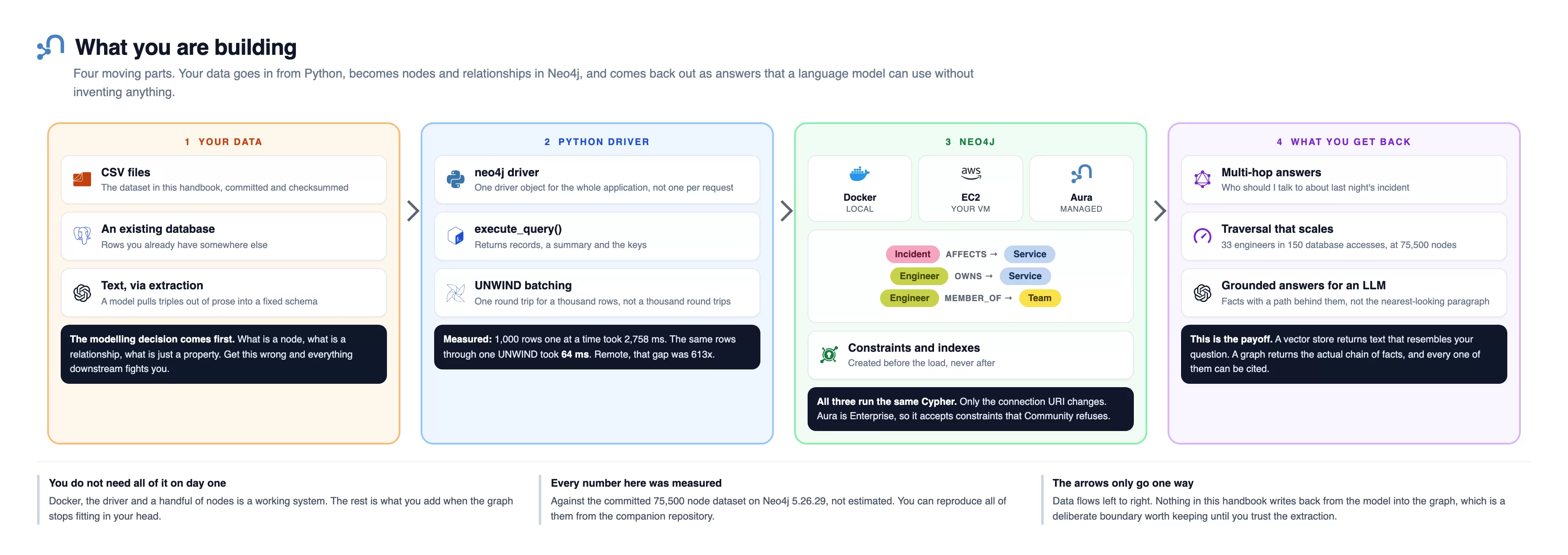
Reading left to right: your data is CSV files, an existing database, or plain text a model pulls triples out of. The Python driver is one driver object for the whole application, execute_query() to run Cypher, and UNWIND to batch a thousand rows into one round trip. Neo4j is where it lands, and it runs identically on Docker, EC2 or Aura because only the connection URI changes. Constraints and indexes are created here before the load, never after.
What you get back is multi-hop answers that hold up at 75,500 nodes, with a path behind each one you can cite.
Three things worth noting: first, you don't need all of it on day one, since Docker, the driver and a handful of nodes is already a working system. Also, every number here was measured against the committed 75,500 node dataset on Neo4j 5.26.29 Community, not estimated. And the arrows only go one way, because nothing in this handbook writes back from the model into the graph, which is a boundary worth keeping until you trust the extraction.
On which version to install: don't worry about matching mine exactly. Everything here was measured on Neo4j 5.26.29 Community, and 5.26 is the long-term support release, which Neo4j supports until June 2028. From 2025 onward they name releases by date instead, so you'll see 2025.01, 2025.02 and so on rather than 5.27. Those are fully compatible with the Cypher and the drivers used here, so the queries in this handbook run unchanged on them.
Two things do vary, and neither is about the version number. Timings depend on your machine, so treat my numbers as ratios rather than targets. And the constraints beyond IS UNIQUE need Enterprise, which is an edition difference rather than a version one. The neo4j:5 Docker tag used below gives you the latest 5.x, which is a good default.
You don't need all of it on day one. Docker, the driver, and a handful of nodes is already a working system. Everything else in this handbook is what you add when the graph stops fitting in your head.
What a Graph Database Actually Stores
A graph database stores three things. That's genuinely all of it.
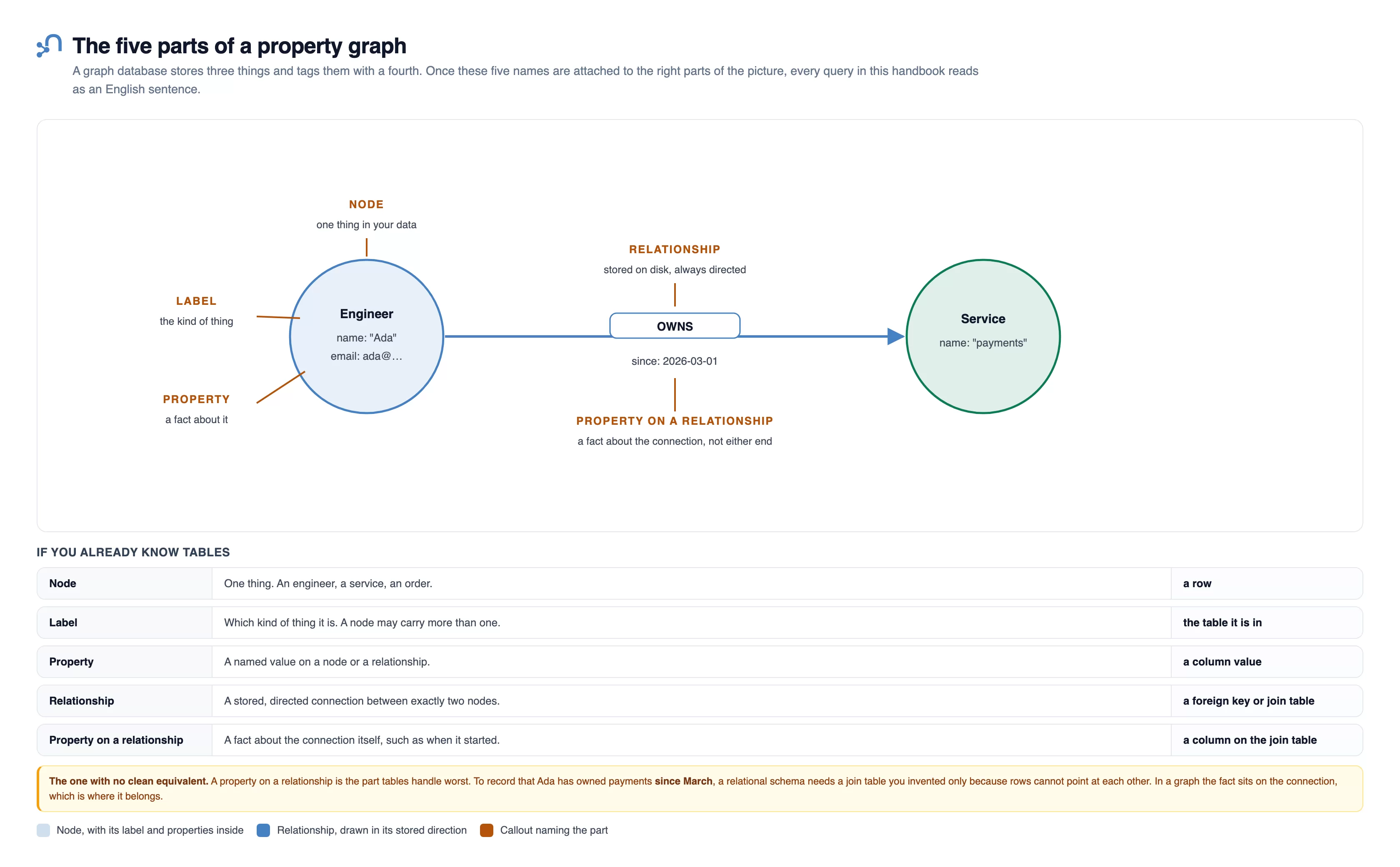
The drawing works one concrete example. An Engineer node holds name: "Ada" and an email. An arrow labelled OWNS carries since: 2026-03-01. A Service node holds name: "payments". Callouts point at each piece in turn. They name which part is the node, which is the label, which is the property, and which is the relationship. The last one they name is the property that sits on the relationship rather than on either end.
The panel underneath contrasts that last one with tables, and it's the piece with no clean relational equivalent. To record that Ada has owned payments since March, a relational schema needs a join table you invented only because rows can't point at each other.
Nodes are the things in your domain: an engineer, service, incident, or team.
Relationships connect exactly two nodes. Every relationship has a direction and a type. An engineer OWNS a service. An incident AFFECTS a service. The direction is stored, and you'll see shortly that you can traverse a relationship in either direction regardless of how it was stored.
Properties are key and value pairs. They live on nodes and on relationships. An engineer node might carry a name and an email. An OWNS relationship might carry the date that ownership started, which is a fact about the connection rather than about either end of it.
Nodes also carry labels, which group them. A node labelled Engineer is an engineer. A node can have more than one label. Labels are how you tell the database to look only at engineers instead of scanning everything you have ever stored.
Here's the same small piece of information in both worlds.
| Concept | Relational | Graph |
|---|---|---|
| A thing | A row in a table | A node |
| The kind of thing | Which table it is in | A label on the node |
| A fact about the thing | A column value | A property |
| A connection | A foreign key, or a join table | A relationship, stored on disk |
| A fact about a connection | A column on the join table | A property on the relationship |
That last row is worth pausing on. In a relational schema, saying "Ada has owned payments since March" needs a column on the join table, and that join table is an implementation detail you invented to work around the fact that rows can't point at each other. In a graph, it's a property on the relationship, which is exactly where the fact belongs.
Index-free Adjacency, the Idea That Makes it Fast
This is the one piece of theory worth understanding properly, because everything else follows from it.
In a relational database, a relationship between two rows is a value you match at query time. The orders table has a customer_id, and when you join, the database looks up matching values. It's good at this. There are indexes and query planners and decades of optimisation behind it. But it's still, fundamentally, a search.
In a graph database, a relationship is a record stored on disk that points directly at both of its nodes. When the database walks from a node to its neighbour, it doesn't search for the neighbour. It follows a pointer.
The name for this is index-free adjacency.
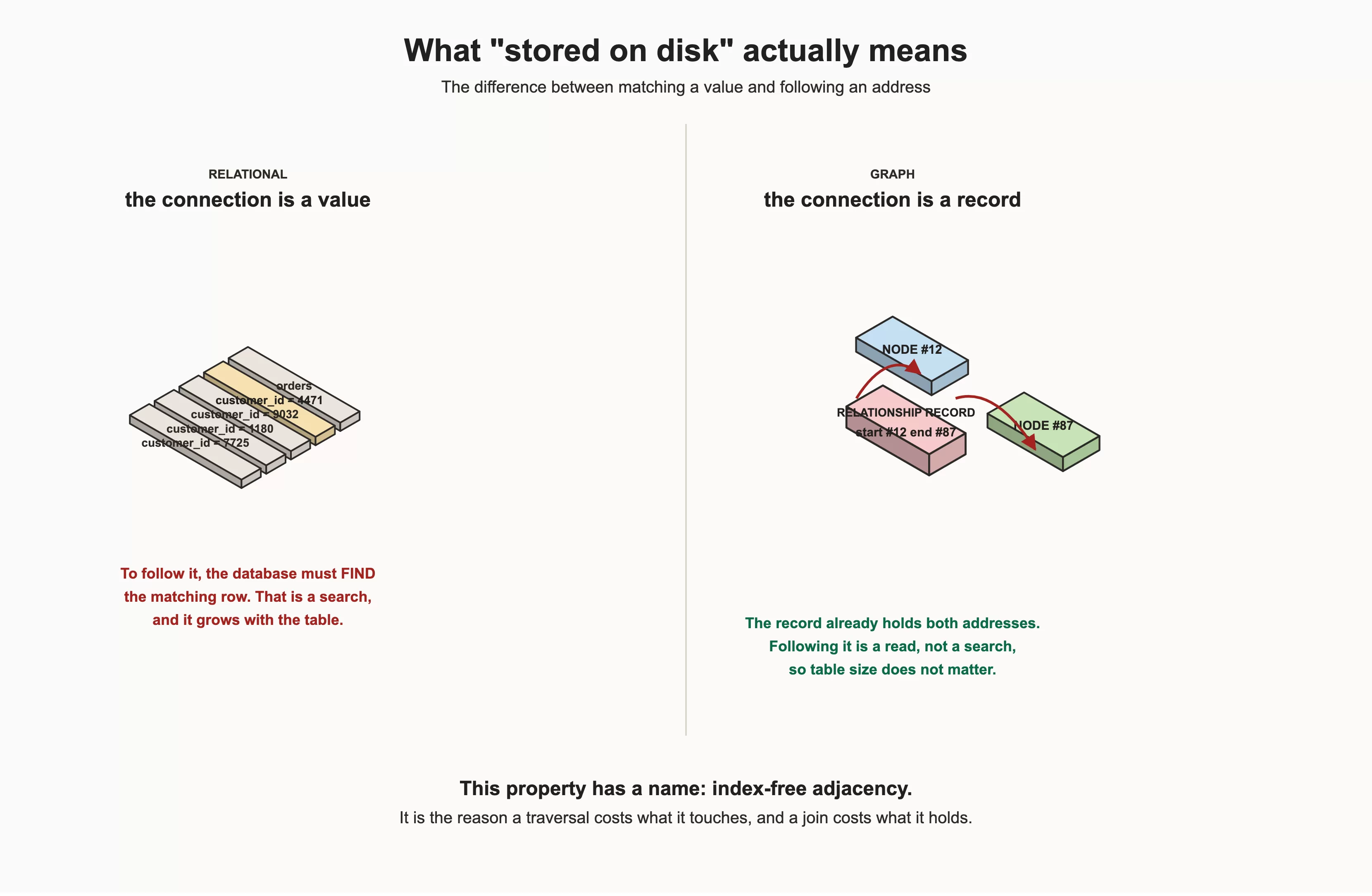
This is where the connection physically lives. Relationally it's a value, a foreign key the database has to find. In a graph it's a pointer beside the node, so following it is a read rather than a search.
The consequence is the thing that matters. Because traversal follows pointers out of nodes you already have in hand, the cost of a traversal is proportional to the size of the part of the graph you touch, not the size of the graph in total. A database ten times larger doesn't make a two-hop query slower.
Compare that with a join. Each additional join reads another table and builds a wider intermediate result. Adding a hop adds work that scales with your data volume.
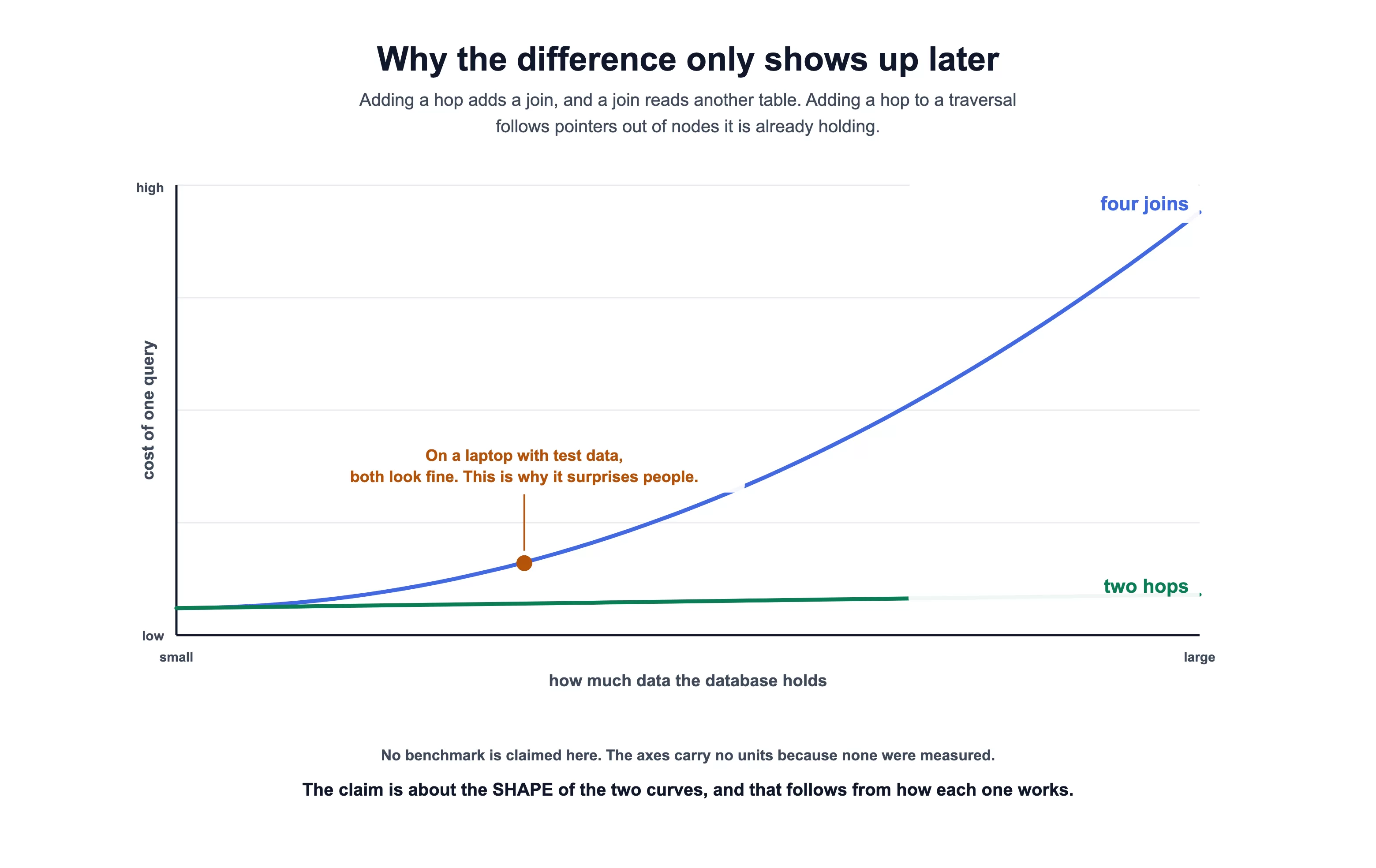
Two curves on the same axes: cost of one query against how much data the database holds. The four-join line climbs steeply as the data grows. The two-hop traversal line stays low and nearly flat. At the small end they sit almost on top of each other, which is the note the figure makes: on a laptop with test data both look fine, and that's why this surprises people in production.
One key caveat drawn on the figure itself: The axes carry no units, because none were measured, and no benchmark is being claimed. The point is the shape of the two curves, which follows from how each one works.
This is why the difference shows up as your data grows rather than on your laptop with test data. Both approaches look fine on ten thousand rows.
A relational database is excellent at answering questions about sets of rows. A graph database is excellent at answering questions about paths between things. Most systems have both kinds of question, which is why most companies end up running both kinds of database.
When a Graph is the Wrong Choice
Every graph tutorial on the internet tells you graphs are wonderful. Here's the other half, because knowing when not to use something is what separates an engineer from an enthusiast.
Use something else when your queries are aggregations over big uniform sets. "Total revenue by region by month" is a relational or columnar question. A graph will answer it, and it will be slower and more awkward than a warehouse would be.
Use something else when your data has no meaningful relationships. A table of log lines is a table of log lines. Modeling each one as a node connected to nothing buys you nothing and costs you storage.
Use something else when you need one thing to be extremely fast and nothing else. A key-value store answering "give me session 4471" will beat everything, because it does exactly one thing.
A graph is the right choice when the connections are the point. Fraud rings, recommendations, access control, dependency analysis, lineage, org structures, supply chains, and knowledge graphs for AI systems. These share one trait: the interesting questions are about how things connect, and the number of hops isn't fixed in advance.
If your query never goes more than one hop, you probably don't need a graph. If your query goes three hops and the number of hops depends on the data, you almost certainly do.
How to Set Up Neo4j and the Python Driver
For this project, you need a database and a driver.
Option A: Neo4j Aura, No Installation
The fastest route is Neo4j Aura, Neo4j's managed cloud service. There's nothing to install, and there's a genuinely free tier.
Go to console.neo4j.io, sign in, and choose Create instance. You'll be shown several tiers side by side, and this is the screen to read carefully rather than click through:
| Tier | Cost | What you get |
|---|---|---|
| Free | $0 | Up to 200,000 nodes and 400,000 relationships. Limited memory and vCPU. Limited backups. Auto-deleted after 30 days of inactivity. |
| Professional | From $0.09 per GB-hour | Monitoring, predefined roles, 7 day backups, graph algorithms |
| Business Critical | From $0.20 per GB-hour | Advanced monitoring, custom roles, IP filtering, SSO, 30 day backups, 99.95% uptime SLA |
Pick Free for this handbook. 200,000 nodes is far more than anything here needs.
Watch the running total at the bottom of that page. The console shows a live hourly rate and a projected monthly cost, and both update as you change tiers.
A paid tier can read as roughly $0.36 per hour. That is about $259 a month if you leave it running. It's very easy to click past that while concentrating on the instance name. If you only want to learn, the number at the bottom should say $0.
Once you confirm, Aura shows you a credentials dialog exactly once:
Username, which is always
neo4jA long generated password
A warning that reads "Note that the password will not be available after this point"
That warning is literal. Click Download and continue to save a .txt file with the connection details, or copy the password somewhere safe first. If you lose it, you can't retrieve it, you can only reset it.
The downloaded file looks like this:
NEO4J_URI=neo4j+s://xxxxxxxx.databases.neo4j.io
NEO4J_USERNAME=neo4j
NEO4J_PASSWORD=<your generated password>
NEO4J_DATABASE=neo4j
AURA_INSTANCEID=xxxxxxxx
AURA_INSTANCENAME=demo
The instance then shows Creating... in the console and takes a few minutes. During that window the hostname already resolves in DNS and port 7687 already accepts TCP connections, but the database behind it isn't up yet, so a driver will fail with Unable to retrieve routing information. That error during the first few minutes means "not ready", not "misconfigured". Wait and retry rather than changing your connection string.
The +s in neo4j+s:// means the connection is encrypted and the server's certificate is verified. Aura requires encryption, and that verification is the only difference from a local instance that matters for this handbook.
If Aura Refuses to Connect and You're Sure it's Running
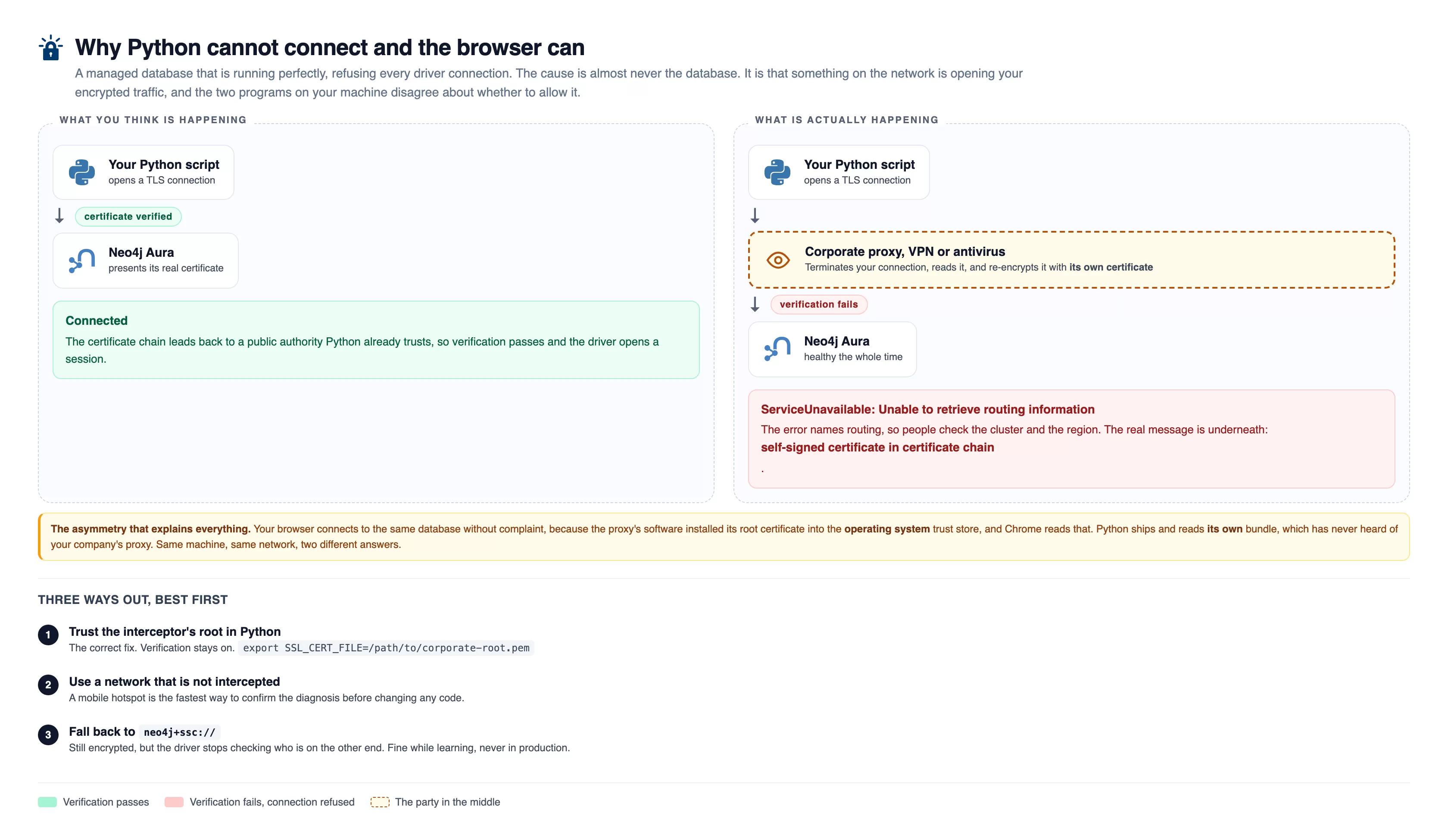
Aura is healthy, the browser connects, Python won't. Something on the network, usually a corporate proxy, VPN or antivirus, terminates your TLS connection, reads it, and re-encrypts it with its own certificate. Your browser was told to trust that certificate. The driver wasn't, so it correctly refuses and you get ServiceUnavailable: Unable to retrieve routing information while the database was fine throughout.
There's one failure here that wastes people hours, because the error message points at the wrong thing.
You connect, and the driver says:
neo4j.exceptions.ServiceUnavailable: Unable to retrieve routing information
"Routing" sounds like a cluster problem, so people go and check the instance, recreate it, and try a different region. Often none of that is the cause.
Check the certificate directly:
import socket, ssl
ctx = ssl.create_default_context()
with socket.create_connection(("xxxxxxxx.databases.neo4j.io", 7687), timeout=15) as raw:
    with ctx.wrap_socket(raw, server_hostname="xxxxxxxx.databases.neo4j.io") as s:
        print("TLS OK", s.version())
If that prints something like CERTIFICATE_VERIFY_FAILED: self-signed certificate in certificate chain, the database is fine. Something on your network is intercepting TLS. Corporate proxies, some VPNs, and several antivirus products do this: they terminate your encrypted connection, inspect it, and re-encrypt it with their own certificate. Your browser trusts that certificate because the software installed its root into the system store. Python does not, because it ships its own trust store.
You have three options, in order of preference.
1. Add the interceptor's root certificate to Python's trust store, which is the correct fix and keeps verification on:
export SSL_CERT_FILE=/path/to/corporate-root.pem
2. Use a network that's not intercepted, such as a mobile hotspot, which is the quickest way to confirm the diagnosis.
3. Fall back to neo4j+ssc://, which encrypts but accepts a self-signed certificate:
driver = GraphDatabase.driver("neo4j+ssc://xxxxxxxx.databases.neo4j.io", auth=AUTH)
The ssc stands for self-signed certificate. Your traffic is still encrypted, but the driver no longer checks who's on the other end, so anyone already intercepting can keep doing it undetected. Use it to unblock yourself while learning, and don't ship it to production.
Every Aura query in this handbook was verified over exactly this route, on a network that turned out to be running TLS inspection.
Option B: Docker, One Command
If you would rather keep everything on your machine, Docker is the shortest path. Everything in this handbook was written and tested against exactly this container.
docker run -d --name neo4j-graphbook \
  -p 7474:7474 -p 7687:7687 \
  -v neo4jdata:/data \
  neo4j:5
Port 7474 serves Neo4j Browser, the query UI you'll use in a moment. Port 7687 is Bolt, the binary protocol the Python driver speaks.
Set the initial password on the volume before the database starts for the first time, because the setting is ignored once a database exists:
docker volume create neo4jdata
docker run --rm -v neo4jdata:/data neo4j:5 \
  neo4j-admin dbms set-initial-password yourpassword
Then open http://localhost:7474 and sign in with neo4j and that password.
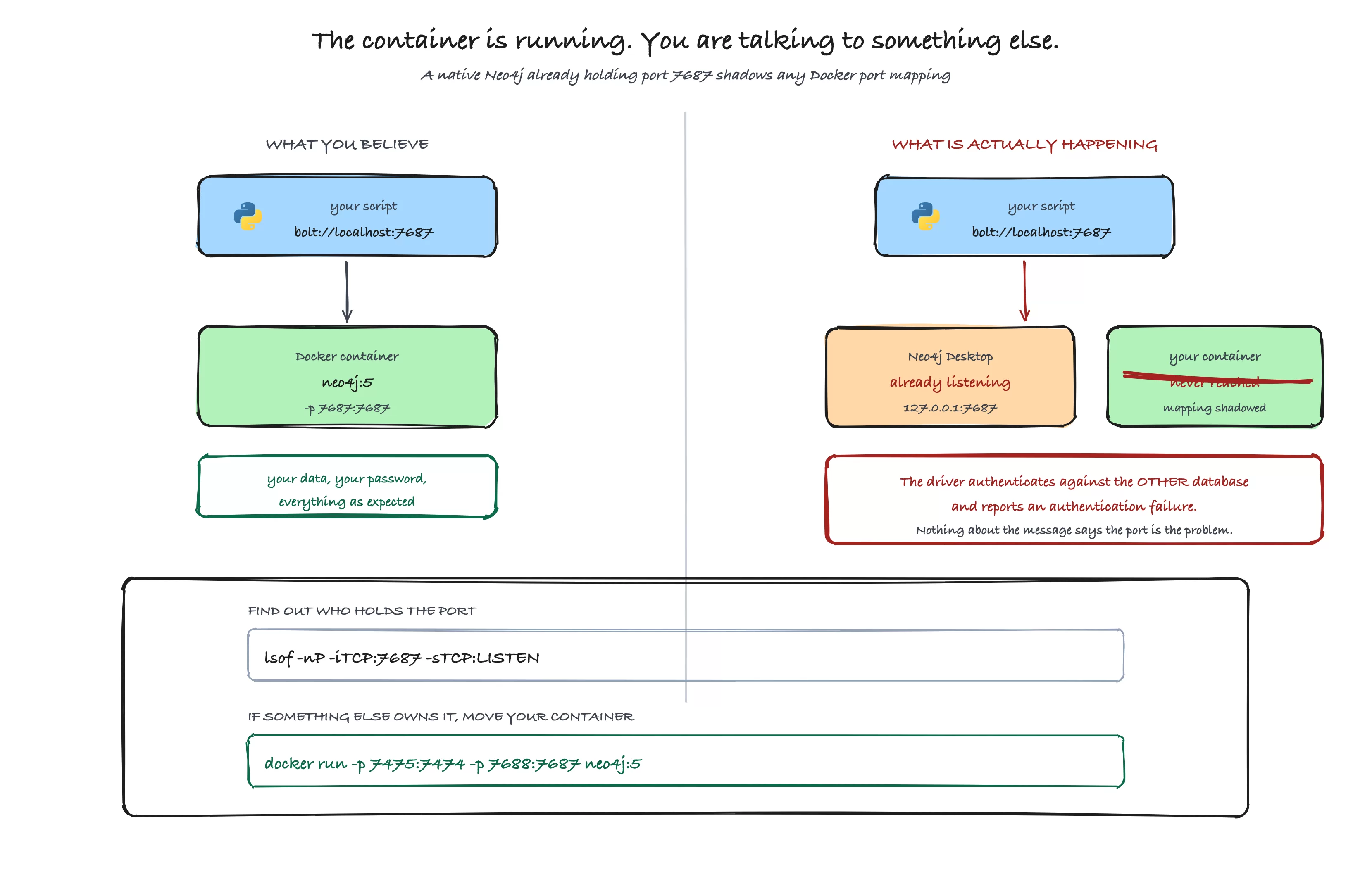
We have two panels here.
What you believe: your script dials
bolt://localhost:7687and reaches the Docker container runningneo4j:5with your data.What's happening: a native Neo4j, usually Neo4j Desktop, is already listening on
127.0.0.1:7687, so it shadows the Docker port mapping and your container is never reached at all. Your script authenticates against that other database, and the driver reports an authentication failure. Nothing in that message mentions ports.
Find out who holds it with lsof -nP -iTCP:7687 -sTCP:LISTEN. If something else owns it, move your container with docker run -p 7475:7474 -p 7688:7687 neo4j:5 and connect on 7688 instead.
A trap worth knowing about: if you already run Neo4j Desktop, or any other Neo4j, it's probably already listening on 7687. A native process holding that port takes precedence over a Docker port mapping, and the symptom is confusing: the container starts fine, Browser loads, and your driver reports an authentication failure, because it's quietly talking to the other database.
If that happens, map the container somewhere else with -p 7475:7474 -p 7688:7687 and point your driver at bolt://localhost:7688. Check what holds the port with lsof -nP -iTCP:7687 -sTCP:LISTEN.
Option C: a Cloud Server You Control
There is a third option worth walking through, because it's closer to how you would actually run this for a team, and because it teaches you what the other two hide. You put Neo4j on a small Linux server in the cloud.
Everything below is exactly what I ran to produce the screenshots in this handbook. It uses AWS, but the shape is identical on any provider.
Step 1. Find out which account you're about to spend money in.
This sounds obvious and it's the step people skip.
aws sts get-caller-identity
aws configure get region
The first prints the account number and the user. The second prints the region. If either isn't what you expected, stop and fix your profile before creating anything.
Step 2. Find the current Linux image.
Instead of hardcoding an image ID from a blog post, ask AWS for the latest one:
aws ssm get-parameters \
  --names /aws/service/ami-amazon-linux-latest/al2023-ami-kernel-default-x86_64 \
  --query 'Parameters[0].Value' --output text
An AMI is a machine image, the template your server boots from. Image IDs differ per region and change over time, which is why you look it up rather than copy it.
Step 3. Create a firewall that only lets you in.
This is the step that matters most, and it's the one that gets people breached.
MYIP=$(curl -s https://checkip.amazonaws.com)/32

SG=$(aws ec2 create-security-group \
  --group-name neo4j-demo-sg \
  --description "Neo4j demo, locked to my IP" \
  --vpc-id <your-default-vpc-id> \
  --query GroupId --output text)

for port in 22 7474 7687; do
  aws ec2 authorize-security-group-ingress \
    --group-id $SG --protocol tcp --port $port --cidr $MYIP
done
A security group is a firewall attached to the server. Port 22 is SSH, 7474 is Neo4j Browser, 7687 is Bolt. The --cidr $MYIP part restricts every one of them to your own address.
Don't replace that with 0.0.0.0/0. That means "the entire internet". Databases left open on default ports are found by automated scanners within hours, not weeks, and an open Neo4j is a full read and write handle on your data.
Step 4. Boot the server and install Neo4j automatically.
A user-data script is a shell script the server runs once, on first boot, as root.
#!/bin/bash
dnf install -y docker
systemctl enable --now docker

# ask the instance what its own public address is
TOKEN=$(curl -sX PUT "http://169.254.169.254/latest/api/token" \
  -H "X-aws-ec2-metadata-token-ttl-seconds: 300")
PUBIP=$(curl -s -H "X-aws-ec2-metadata-token: $TOKEN" \
  http://169.254.169.254/latest/meta-data/public-ipv4)

docker run -d --name neo4j --restart unless-stopped \
  -p 7474:7474 -p 7687:7687 \
  -e NEO4J_AUTH=neo4j/ChangeThisPassword \
  -e NEO4J_server_default__listen__address=0.0.0.0 \
  -e NEO4J_server_bolt_advertised__address=$PUBIP:7687 \
  -e NEO4J_server_http_advertised__address=$PUBIP:7474 \
  neo4j:5
Three details in there are the whole reason this section exists.
169.254.169.254 is the instance metadata service, a special address every AWS server can reach to ask questions about itself. Here it is asking for its own public IP.
NEO4J_server_default__listen__address=0.0.0.0 tells Neo4j to accept connections from outside the machine. By default it listens only on localhost, and without this your server would be running perfectly and refusing every connection.
The advertised address settings are the subtle one. Neo4j Browser is a web page served by the server, and when it opens a Bolt connection it uses the address the server advertises. If the server advertises localhost, the Browser running in your laptop's browser will try to connect to your laptop. Setting the advertised address to the public IP is what makes a remote Browser work at all.
Note the double underscores. In Neo4j's environment variables, a dot in a config key becomes an underscore and a real underscore becomes a double underscore, so server.default_listen_address becomes NEO4J_server_default__listen__address.
Step 5. Launch it.
aws ec2 run-instances \
  --image-id <ami-from-step-2> \
  --instance-type t3.medium \
  --key-name <your-key-pair> \
  --security-group-ids $SG \
  --associate-public-ip-address \
  --user-data file://userdata.sh \
  --tag-specifications 'ResourceType=instance,Tags=[{Key=Name,Value=neo4j-demo}]'
t3.medium gives 2 CPUs and 4GB of memory, which is comfortable for learning. Neo4j will start on 1GB but you'll fight it.
Boot, package install, and image pull took about 90 seconds. Poll until the Browser answers rather than guessing:
until curl -s -o /dev/null -w "%{http_code}" http://<public-ip>:7474 | grep -q 200; do
  sleep 10
done
Step 6. Delete it when you're finished.
A server you forgot about bills every hour, forever.
aws ec2 terminate-instances --instance-ids <instance-id>
aws ec2 delete-security-group --group-id $SG
I can't stress this enough for anyone learning on their own account: set a billing alarm, and terminate the moment you're done. The instance used for this handbook existed for under an hour and cost a few cents, but only because I deleted it after.
The Driver
pip install neo4j
That installs the official driver. At the time of writing it's version 6.x and supports Python 3.10 and above.
Connecting
The driver object is expensive to create and cheap to reuse. Create one when your program starts, and keep it. Creating a driver per request is a common and costly mistake, because each one builds its own connection pool.
from neo4j import GraphDatabase

URI = "neo4j+s://xxxxxxxx.databases.neo4j.io"
AUTH = ("neo4j", "your-password")

with GraphDatabase.driver(URI, auth=AUTH) as driver:
    driver.verify_connectivity()
    print("Connected")
There are two things worth doing every time:
verify_connectivity() fails immediately with a clear error if the URI or the password is wrong. Without it, your first failure happens inside a query, where the error is less obvious and harder to attribute.
Using the driver as a context manager, with with, closes it cleanly when the block exits. In a long-running service you would instead create the driver at startup and close it during shutdown.
Never put credentials in your source. Read them from the environment:
import os
from neo4j import GraphDatabase

driver = GraphDatabase.driver(
    os.environ["NEO4J_URI"],
    auth=(os.environ["NEO4J_USER"], os.environ["NEO4J_PASSWORD"]),
)
The Modeling Decision That Matters Most
Before you write a single row of data you have to decide what becomes a node, what becomes a property, and what becomes a relationship.
This is the part that decides whether your graph is a pleasure or a problem six months from now. It's also the part that no query optimiser can fix for you later.
Here are the rules:
Make it a node if you'll ever ask a question about it. If you want to know which engineers work on the payments service, then the payments service is a node. If you want to count incidents by severity, severity is a candidate for a node.
Make it a property if it only ever describes something else. The timestamp on an incident is a property. Nobody asks a database to find all the things that happened at 14:32 and then traverse outwards from that moment.
Make it a relationship if it connects two nodes and you want to walk it. Ownership connects an engineer to a service, and the entire point is walking from one to the other, so it's a relationship.
A useful test: can you imagine drawing an arrow to it? If yes, it's probably a node. Nobody draws an arrow to a timestamp.
Another useful test: would you ever want to attach something else to it? Teams have managers, budgets, and charters. That's three arrows waiting to happen, which means a team is a node, not a string.
Relationship Direction
Every relationship in Neo4j has a direction. You store (:Engineer)-[:OWNS]->(:Service) because an engineer owns a service and not the other way round.
Direction matters when you write the data. It matters much less when you query, because you can traverse against the stored direction, and you can ignore direction entirely.
// follow the stored direction
MATCH (e:Engineer)-[:OWNS]->(s:Service) RETURN e, s

// traverse against it: start from the service
MATCH (s:Service)<-[:OWNS]-(e:Engineer) RETURN s, e

// ignore direction entirely
MATCH (e:Engineer)-[:OWNS]-(s:Service) RETURN e, s
Those three return the same pairs. Store the direction that reads naturally as an English sentence, and stop worrying about it.
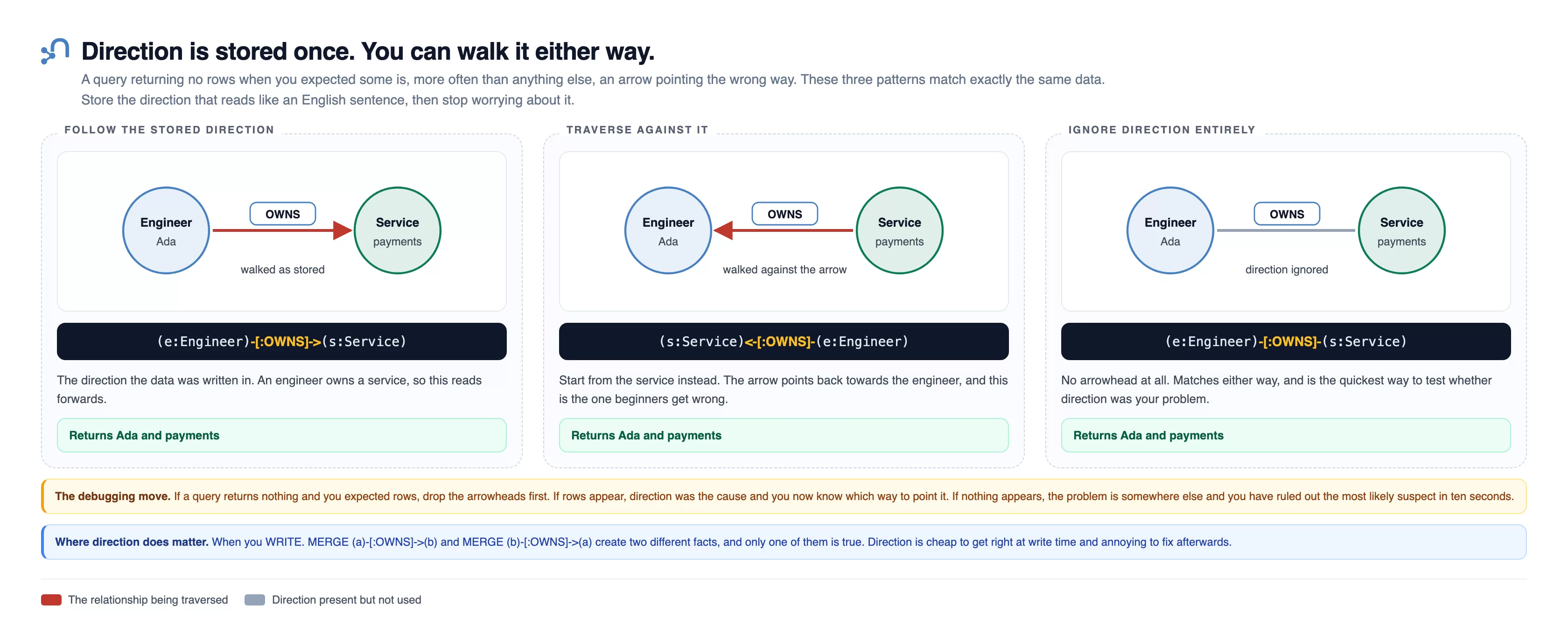
Three patterns matching identical data: walking the stored direction, walking against it, and dropping the arrowhead to ignore direction. All three return Ada and payments.
That third one is the debugging move. If a query returns nothing and you expected rows, drop the arrowheads. If rows appear, direction was the cause. If not, you've ruled out the likeliest suspect in ten seconds. Direction does matter when you write: MERGE (a)-[:OWNS]->(b) and the reverse create two different facts, and only one is true.
Properties on Relationships
This is the feature people forget exists, and it's often the cleanest answer.
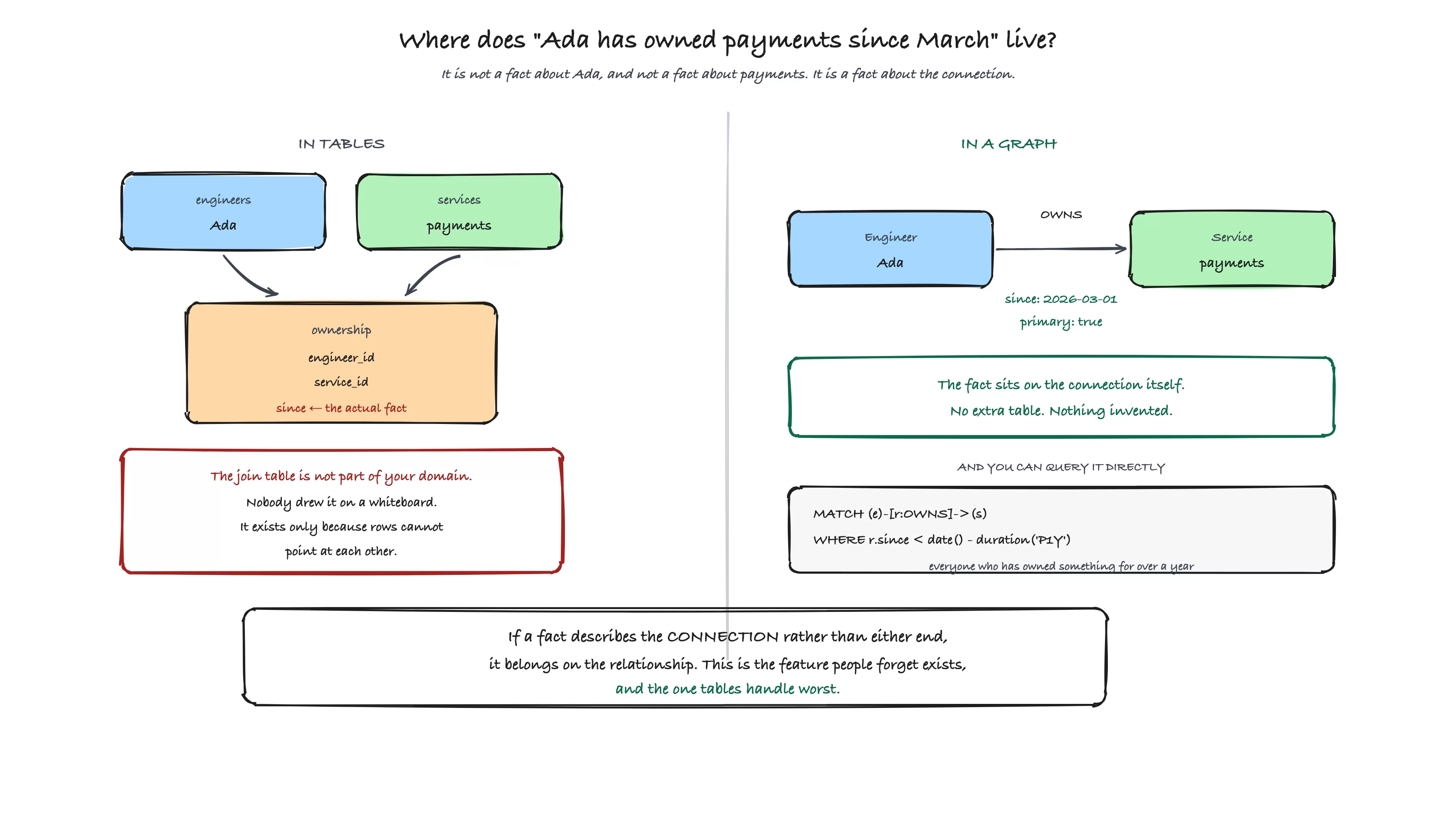
One fact, stored two ways. In tables, since lives on an ownership join table that isn't part of your domain and exists only because rows can't point at each other. In a graph it sits on the connection, and you can query it directly: MATCH (e:Engineer)-[r:OWNS]->(s:Service) WHERE r.since < date() - duration('P1Y') gives you everyone who has owned something for more than a year.
MERGE (e:Engineer {email: 'ada@example.com'})-[r:OWNS]->(s:Service {name: 'payments'})
  SET r.since = date('2026-03-01'), r.primary = true
Now you can ask who has owned a service for longer than a year, without inventing a join table to hold the fact.
Three Modeling Mistakes Almost Everyone Makes
I've watched these three mistakes happen more times than any others, and each one is easy to avoid once you've seen it.
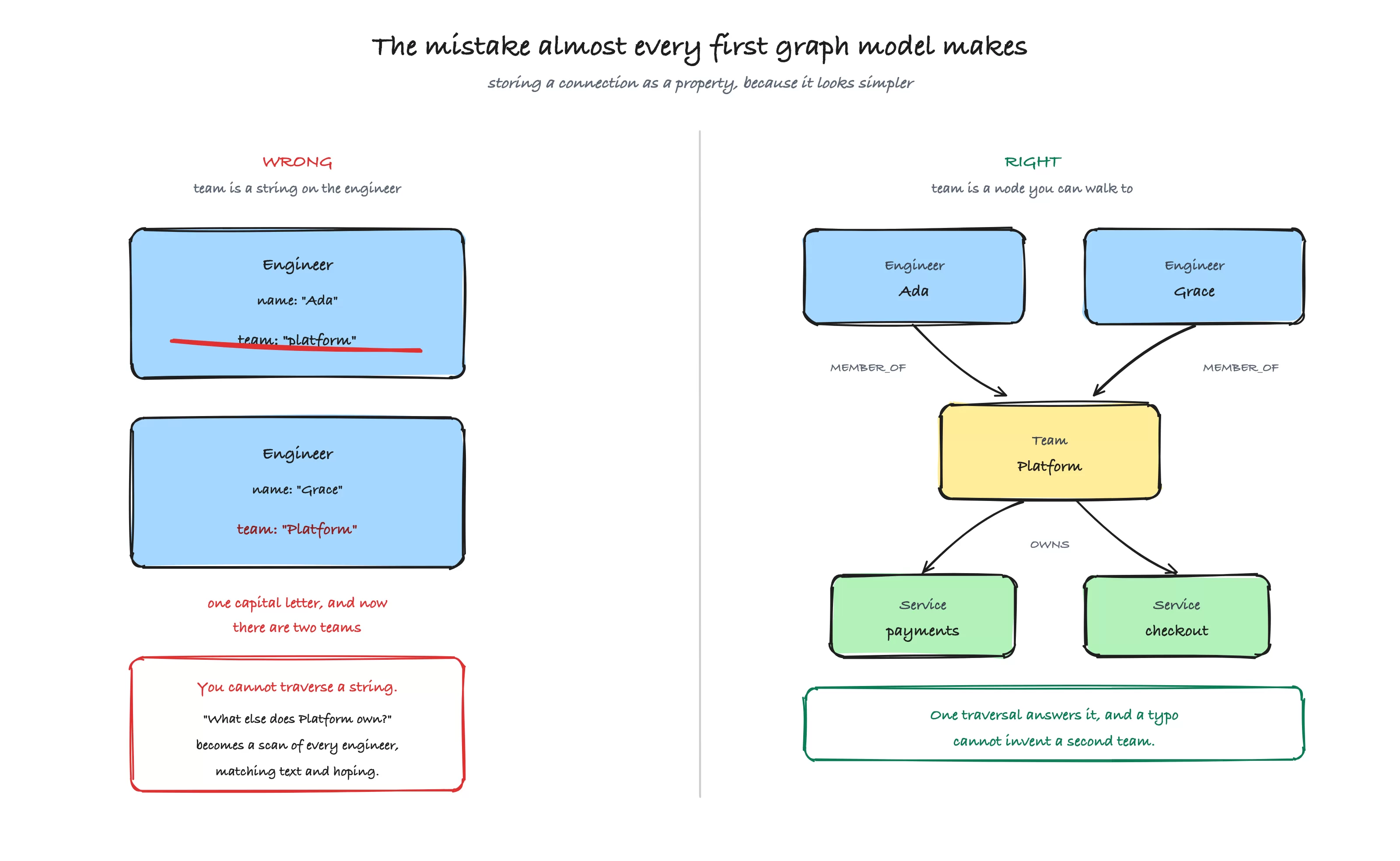
Almost every first graph model makes this one: storing a connection as a property because it looks simpler. It can't be traversed, can't carry facts of its own, and turns into string matching.
Mistake #1: Storing a Connection as a Property
You give each engineer a team property holding the string "platform".
This works right up until you want to know what else the platform team owns. Now you're matching strings scattered across thousands of nodes. Worse, the moment someone writes "Platform" with a capital P, you've silently created a second team, and no error was raised.
The fix is to make the team a node and connect engineers to it. Both problems disappear at once, and you gain somewhere to hang the team's manager and budget later.
The general form of this mistake: anything you want to traverse must be a relationship. A property holding a list of identifiers is a graph database pretending to be a spreadsheet.
Mistake #2: One Generic Relationship Type for Everything
You create a RELATED_TO relationship and put a type property on it to say what kind of relation it is.
This looks flexible. It's the opposite. Neo4j narrows the search by relationship type before it walks anything, so -[:OWNS]-> is fast. Filtering on a property means walking every RELATED_TO relationship first, then discarding most of them, which is exactly the row-scanning behaviour you moved to a graph to avoid.
Name your relationships for what they mean: OWNS, AFFECTS, MEMBER_OF, or DEPENDS_ON. Specific types are both faster and self documenting.
Mistake #3: Making Everything a Node
This is the overcorrection, and it's its own problem.
If a value only ever describes one node, and you never search for it independently, it's a property. Creating a node for every timestamp gives you a much larger graph, slower traversals, and nothing whatsoever in return.
The test remains the same. Will you ask a question about it, or attach something to it? If not, it's a property.
Modeling Backwards From Your Questions
Here's a technique that will save you a rewrite.
Don't start by modeling your domain. Start by writing down the questions the graph has to answer, in plain English, before you draw anything.
For our example:
Which services did this incident affect?
Who owns those services?
Which teams do those owners belong to?
Which services depend on the one that broke?
Who has been on call for this service in the last month?
Now check your model against the list. Every question should be a path you can trace with your finger. If a question requires a join across two properties, or a scan of every node of some label, the model is wrong for that question.
Question five is a good example of why this matters. "On call in the last month" is a fact about a period of time connecting a person and a service. That's a relationship with properties on it, and if you had modeled on-call as a boolean property on the engineer, you would've discovered the problem after loading your data instead of before.
Relational modeling teaches you to normalise first and query later. Graph modeling works better in the other direction.
Three Modeling Patterns Worth Knowing Early
Once the basics land, three patterns cover most of what you'll hit in real data.
When a Relationship Needs More Than Two Ends
A relationship connects exactly two nodes. Sometimes a fact connects three or more.
"Ada was on call for payments during March" involves a person, a service, and a time window. You can't hang that off a single relationship without losing something.
The pattern is to promote the fact itself to a node:
MERGE (e:Engineer {email: 'ada@example.com'})
MERGE (s:Service {name: 'payments'})
CREATE (r:OnCallRotation {start: date('2026-03-01'), end: date('2026-03-31')})
MERGE (e)-[:SERVED]->(r)
MERGE (r)-[:FOR_SERVICE]->(s)
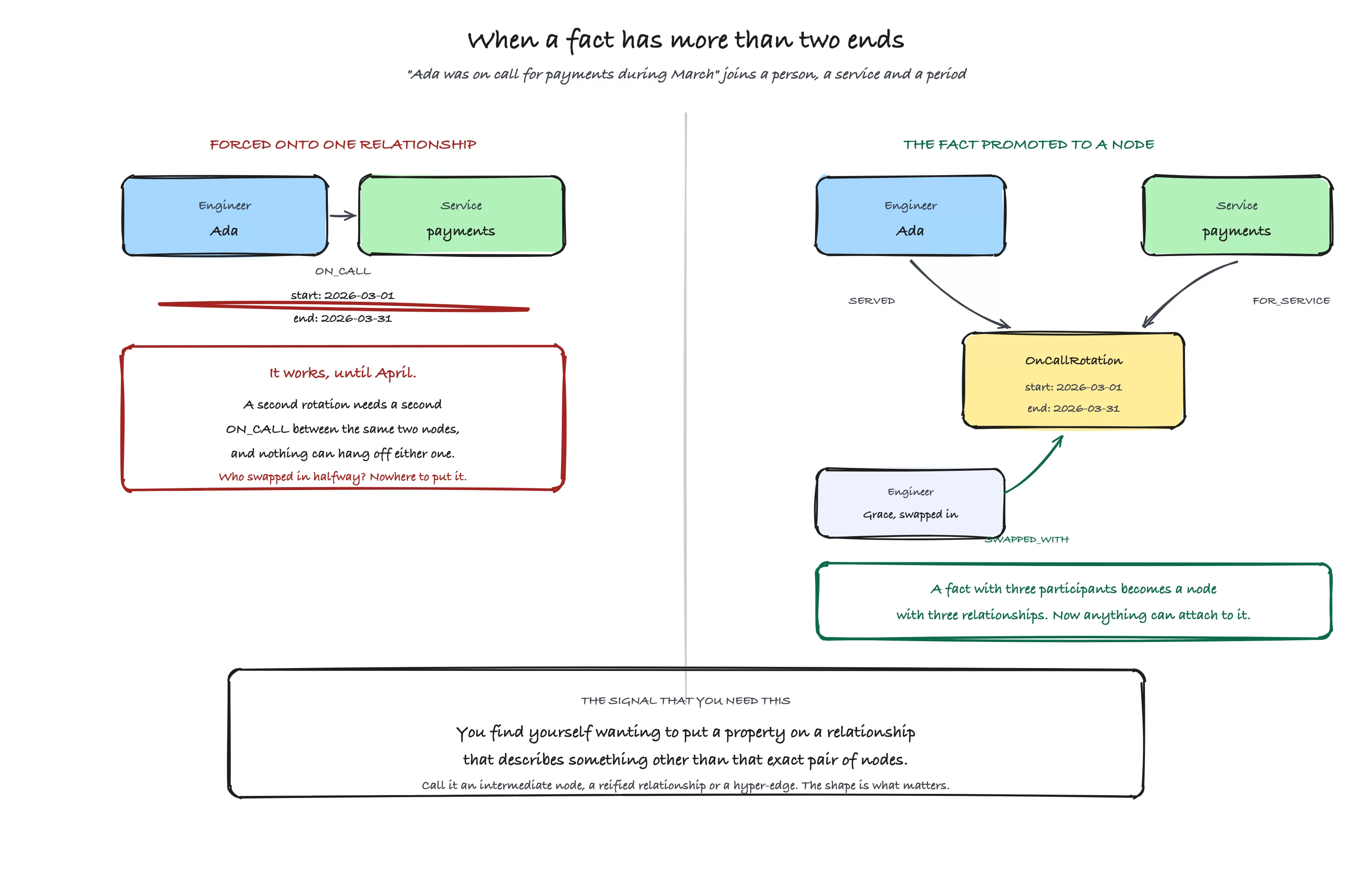
"Ada was on call for payments during March" has three participants and a relationship has two ends. Forced onto one ON_CALL, it breaks in April, because a second rotation needs a second relationship between the same nodes and nothing can hang off either. Promote the fact to a node and it gets three relationships, so anything can attach. The signal is wanting to put a property on a relationship that describes something other than that exact pair.
OnCallRotation is sometimes called an intermediate node, a reified relationship, or a hyper-edge. The name doesn't matter. What matters is that a fact with three participants becomes a node with three relationships, and now you can attach more to it later, such as who swapped in halfway through.
The signal that you need this: you find yourself wanting to put a property on a relationship that describes something other than that exact pair of nodes.
Versioning, When Facts Change Over Time
Graphs are easy to update in place, which makes it tempting to overwrite. If history matters, don't.
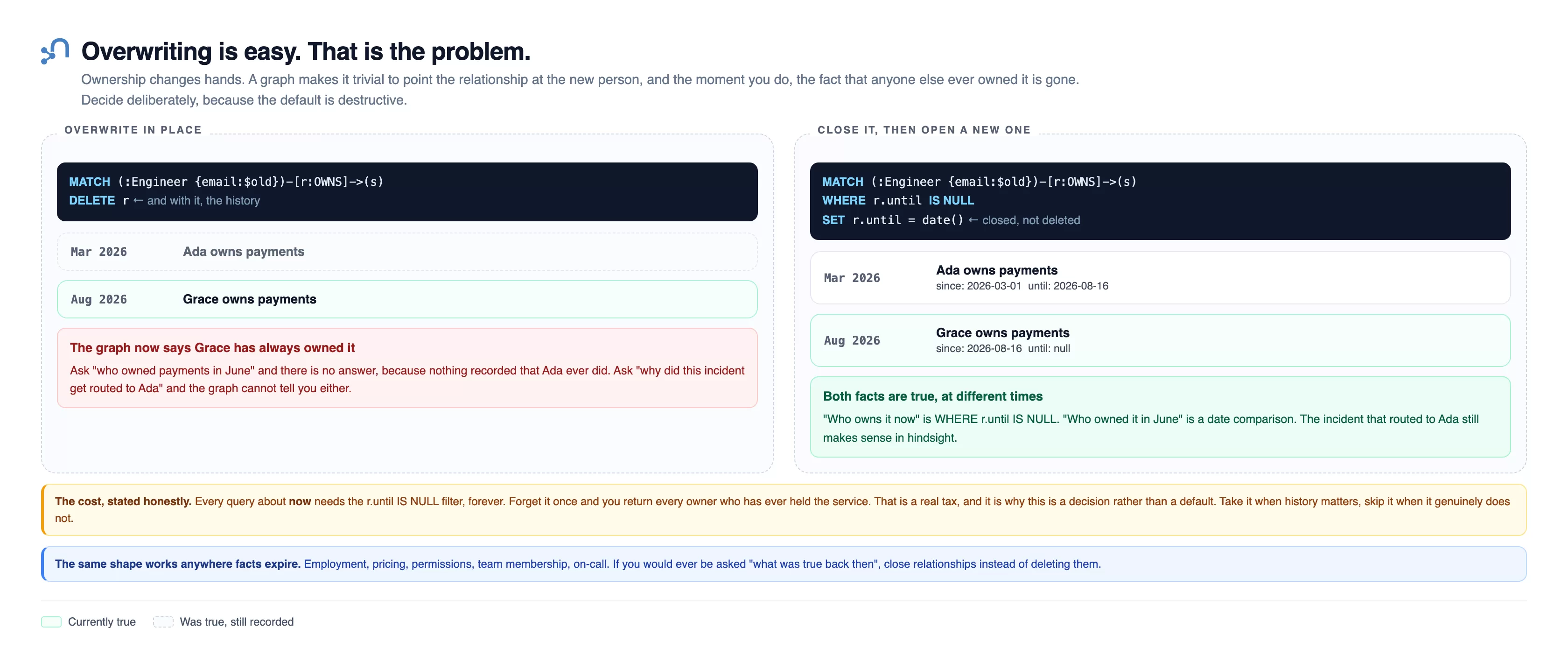
Ownership changes hands, and pointing the relationship at the new person erases that anyone else ever held it. The alternative closes the old relationship with an end date and opens a new one, so history survives. Overwriting is what happens if you don't decide.
The usual pattern is to keep the relationship and mark it closed rather than deleting it:
// close the old ownership rather than deleting it
MATCH (e:Engineer {email: $old})-[r:OWNS]->(s:Service {name: $service})
WHERE r.until IS NULL
SET r.until = date()

// open a new one
MATCH (e:Engineer {email: $new}), (s:Service {name: $service})
MERGE (e)-[r2:OWNS]->(s)
  ON CREATE SET r2.since = date()
Current ownership is then WHERE r.until IS NULL, and history is still there when someone asks who owned this last year. The cost is that every query about "now" needs that filter, so decide deliberately rather than by accident.
Hierarchies, Which Graphs Are Unusually Good At
Trees are painful in SQL and trivial here. An organisation, a category tree, a folder structure, and a dependency chain are all the same shape.
// everyone under a given manager, at any depth
MATCH path = (m:Engineer {email: $email})<-[:REPORTS_TO*1..10]-(report:Engineer)
RETURN report.name AS name, length(path) AS depth
ORDER BY depth, name
Naming the path with path = is what lets you call length() on it, which returns the number of relationships traversed and therefore how far down the tree each person sits.
This is the query that makes people switch. In SQL it's a recursive common table expression that most engineers have to look up every time. Here it's one line, and changing the depth is changing a number.
Loading Data From Python
The modern driver gives you one method for running a query: execute_query. It manages sessions and retries for you, and it's the right default.
Start with a single engineer and a single service.
driver.execute_query(
    """
    MERGE (e:Engineer {email: $email})
      SET e.name = $name
    MERGE (s:Service {name: $service})
    MERGE (e)-[:OWNS]->(s)
    """,
    email="ada@example.com",
    name="Ada",
    service="payments",
    database_="neo4j",
)
Three things in that snippet deserve attention.
MERGE Rather Than CREATE
CREATE always makes a new node. Run your loading script twice and you have two identical engineers, two identical services, and a mess.
MERGE looks for a node matching the pattern and creates one only if nothing matches. That makes the script safe to run again, which you'll want the very first time it fails halfway through a load.
The rule of thumb: CREATE when you know the thing is new, MERGE when you're loading from a source that might contain something you already have.
Merge on Identity, Then Set Everything Else
Look carefully at where the properties are.
MERGE (e:Engineer {email: $email})
  SET e.name = $name
The MERGE is on email alone, and the name is applied afterwards with SET.
If you had merged on both email and name, then the day someone changes their name you would create a second node rather than updating the first. You would end up with two Adas, connected to different things, and no error to tell you.
Merge on the property that identifies the node. Set the rest.
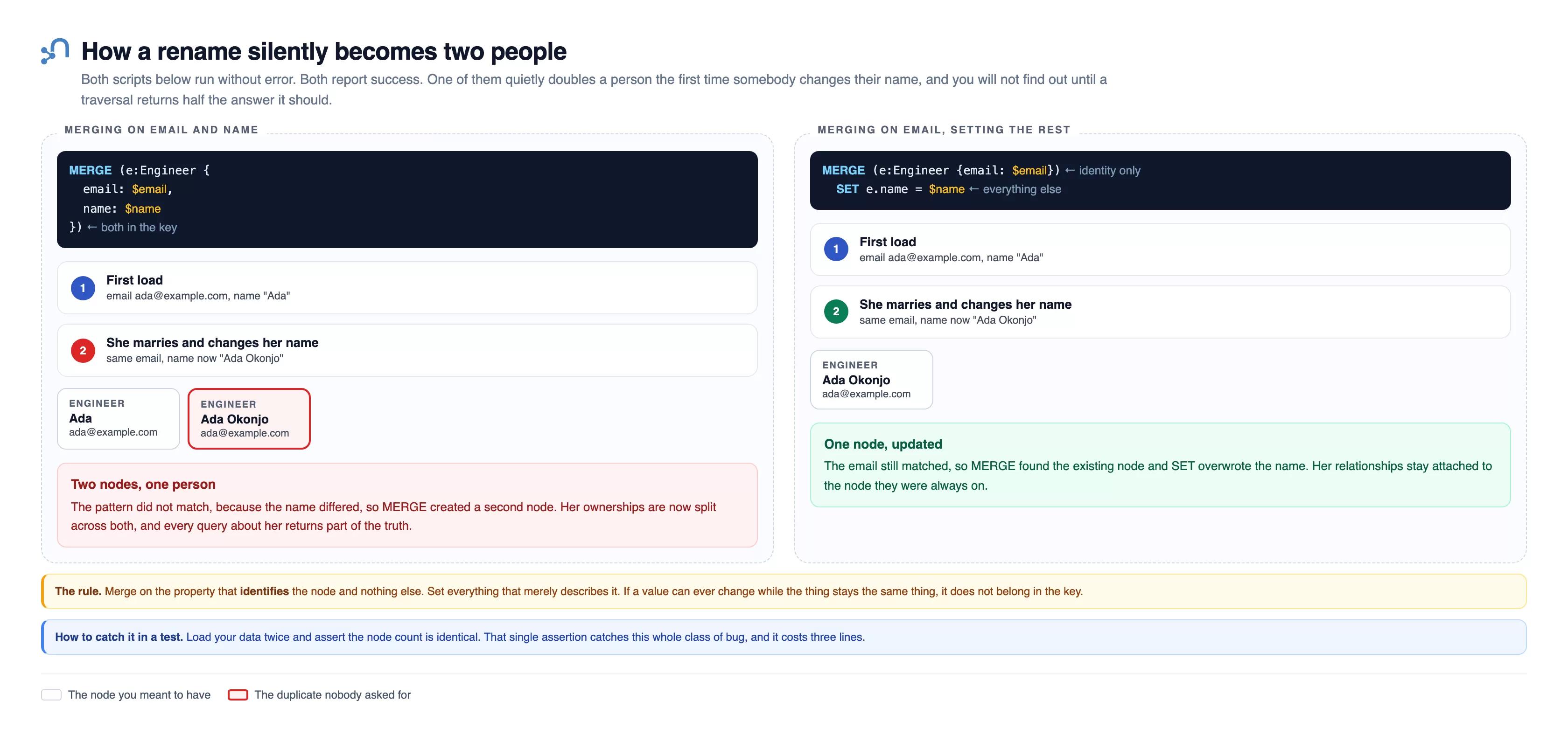
Two scripts that both run without error and both report success. The left merges on email and name together. The right merges on email alone and sets the name afterwards.
Load them once and they look identical. Then Ada marries and changes her name to Ada Okonjo, same email. On the left the pattern no longer matches, because the name differs, so MERGE creates a second node. Her ownerships are now split across both, and every query about her returns part of the truth.
On the right the email still matched, so MERGE found the existing node and SET overwrote the name, and her relationships stay attached to the node they were always on.
The rule: merge on the property that identifies the node and nothing else, and set everything that merely describes it. If a value can change while the thing stays the same thing, it doesn't belong in the key. You can catch this whole class of bug by loading your data twice and asserting the node count is identical, which costs three lines.
There's a matching variant when you want different behaviour on first insert versus update:
MERGE (e:Engineer {email: $email})
  ON CREATE SET e.name = $name, e.created = datetime()
  ON MATCH  SET e.name = $name, e.last_seen = datetime()
Parameters, Never String Formatting
The values are passed separately as $email and $name. Never build a query by concatenating strings.
This protects you from injection, which is the obvious reason. There's a second reason that matters for performance: Neo4j caches query plans keyed on the query text. Parameterised queries have identical text every time, so the plan is compiled once and reused. String-formatted queries produce a new plan for every distinct value, which fills the plan cache with garbage and recompiles constantly.
Loading at Scale with UNWIND
One node at a time means one network round trip per node. Loading ten thousand records that way is slow, and almost all of the time is spent waiting rather than working.
Send a list instead and let Cypher loop inside the database.
rows = [
    {"email": "ada@example.com",   "name": "Ada",   "service": "payments"},
    {"email": "linus@example.com", "name": "Linus", "service": "checkout"},
    {"email": "grace@example.com", "name": "Grace", "service": "payments"},
]

driver.execute_query(
    """
    UNWIND $rows AS row
    MERGE (e:Engineer {email: row.email})
      SET e.name = row.name
    MERGE (s:Service {name: row.service})
    MERGE (e)-[:OWNS]->(s)
    """,
    rows=rows,
    database_="neo4j",
)
UNWIND takes a list and turns it into rows, so everything after it runs once per element, all inside a single transaction and a single round trip.
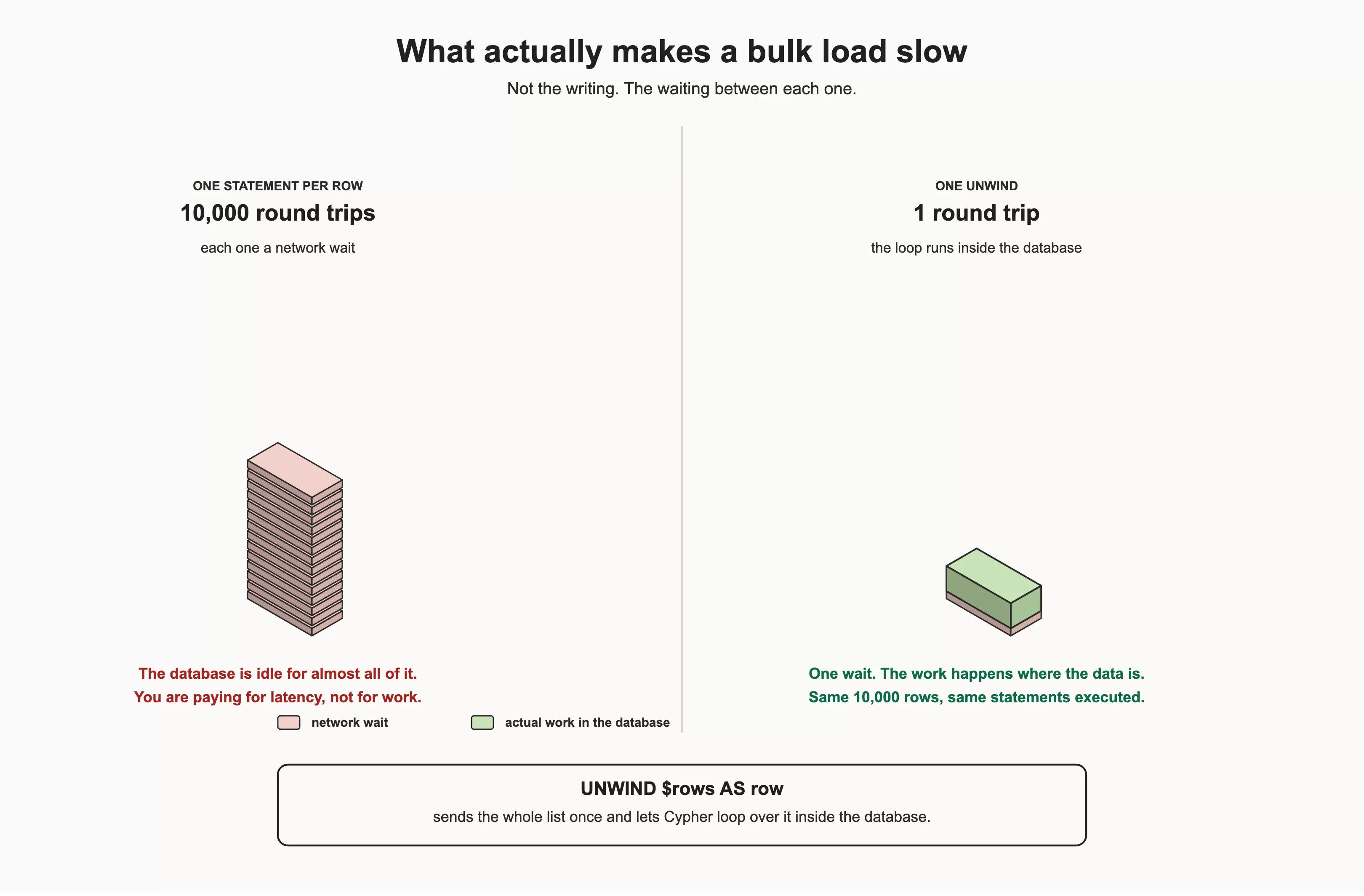
What makes a bulk load slow isn't the writing, it's the waiting between writes. One statement per row is a network round trip per row. One UNWIND sends the batch in a single trip and lets the database loop internally.
This is not a small optimisation. Writing 1,000 rows to the 75,500 node dataset, one statement per row against a single UNWIND:
| Approach | Round trips | Time |
|---|---|---|
| One statement per row | 1,000 | 2,758 ms |
One UNWIND |
1 | 64 ms |
Forty-three times faster, on a database running on the same machine as the client, where a round trip costs almost nothing. Run it yourself and you'll get a different multiple, somewhere in the same region: a clean checkout on this machine measured sixty-six.
The gap grows with distance. I ran the same comparison against a managed instance in another city and measured 91,722 ms against 150 ms, which is 613 times. Nothing about the work changed. What changed is that each of the 1,000 round trips now pays for a journey across the country and back. A minute and a half became a seventh of a second.
That's the real lesson: the cost of chattiness isn't fixed. It is however far away your database happens to be, multiplied by how many times you talk to it.
For a real load, batch it. One enormous transaction holds every change in memory until it commits, and a transaction containing a million updates is a good way to exhaust the heap.
def load_in_batches(driver, rows, batch_size=5000):
    query = """
    UNWIND $rows AS row
    MERGE (e:Engineer {email: row.email})
      SET e.name = row.name
    MERGE (s:Service {name: row.service})
    MERGE (e)-[:OWNS]->(s)
    """
    for start in range(0, len(rows), batch_size):
        batch = rows[start:start + batch_size]
        driver.execute_query(query, rows=batch, database_="neo4j")
        print(f"loaded {start + len(batch)} of {len(rows)}")
A few thousand rows per batch is a reasonable starting point. Tune it by watching memory rather than by guessing.
Loading From a CSV File
Most real data starts life in a spreadsheet or an export. There are two ways to get it in, and picking the wrong one is a common source of frustration.
Option #1: Read it in Python, Send it with UNWIND
This is the one to reach for by default. You already know how it works, it runs anywhere, and you can clean the data on the way through.
import csv

def load_csv(driver, path, batch_size=5000):
    with open(path, newline="", encoding="utf-8") as f:
        rows = list(csv.DictReader(f))

    query = """
    UNWIND $rows AS row
    MERGE (e:Engineer {email: row.email})
      SET e.name = row.name
    MERGE (s:Service {name: row.service})
    MERGE (e)-[:OWNS]->(s)
    """
    for start in range(0, len(rows), batch_size):
        driver.execute_query(query, rows=rows[start:start + batch_size], database_="neo4j")
<